PaperCut MF · Canon
Why does PaperCut MF integrated scanning fail on a Canon imageRUNNER ADVANCE Pro?
Scan to My Email from the PaperCut MF panel returns "Scan failed" with no other error. The cause is the Limit New Destination setting on the device.
Applies to
Canon imageRUNNER ADVANCE Pro devices running PaperCut MF embedded, using integrated scanning (Scan to My Email).
Cause
Limit New Destination is enabled for E-Mail, I-Fax and File under the device Send settings. PaperCut MF integrated scanning sends to a destination the device treats as new, so the device refuses the job.
Steps
Confirm the symptom. On the device panel, the user signs in to PaperCut MF, selects Scan to My Email and presses Start. The job ends with Scan failed and no further detail.
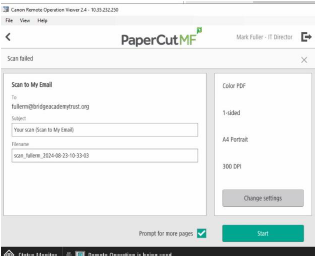
Check the logs. Review the device logs and the PaperCut MF logs for the failed job. The logs show the send being rejected by the device rather than by PaperCut or the mail server.
Open the send restriction settings. Log in to the device Remote UI as Administrator and go to Settings/Registration > Function Settings > Send > Limit New Destination.
Turn Limit New Destination off. Untick E-Mail, I-Fax and File, then click OK. With these ticked, the device blocks any destination that is not already in its address book, which includes the address PaperCut MF passes for integrated scanning.
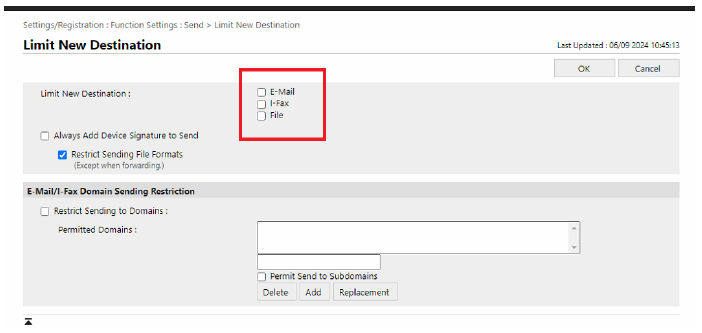
Retest. Run Scan to My Email from the PaperCut MF panel again and confirm the scan arrives.
Was this article helpful?
That’s Great!
Thank you for your feedback
Sorry! We couldn't be helpful
Thank you for your feedback
Feedback sent
We appreciate your effort and will try to fix the article