Finding your printer details
How do I find the IP address of my Ricoh printer?
It's on the Check Status screen at the printer — no sign-in needed.
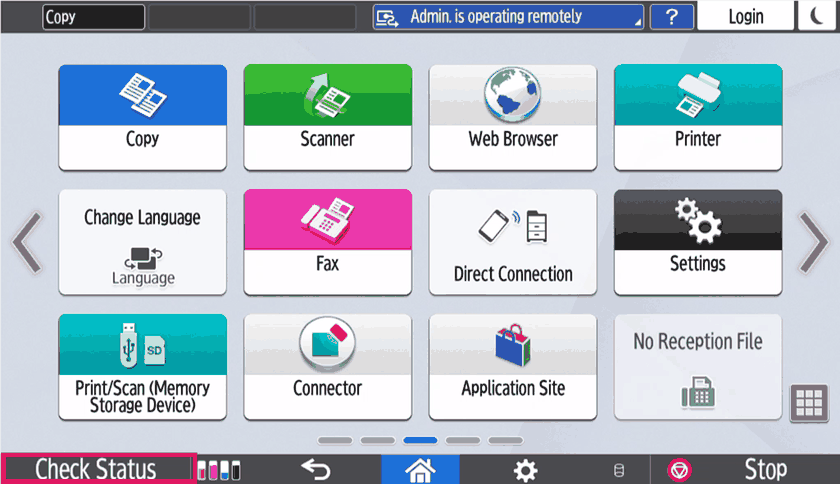
Press Check Status
It's in the bottom-left corner of the printer's home screen.
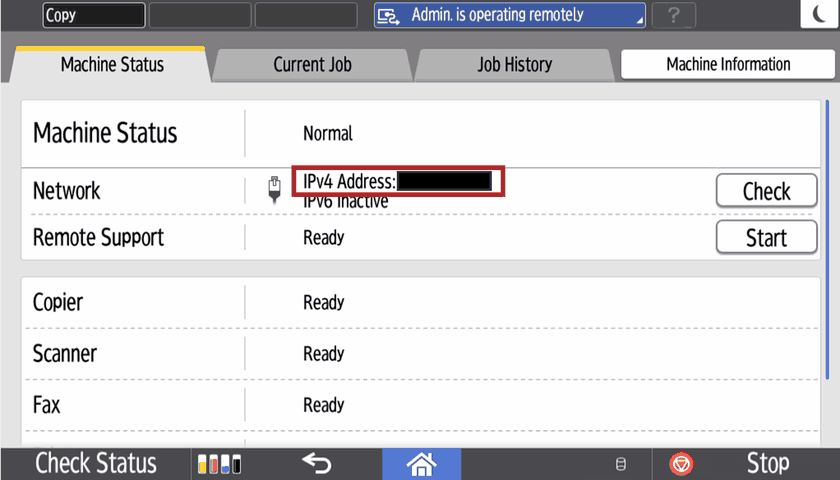
Read the IPv4 Address
On the Machine Status tab, look at the Network line. The address is shown as IPv4 Address and will look something like 192.168.1.47.
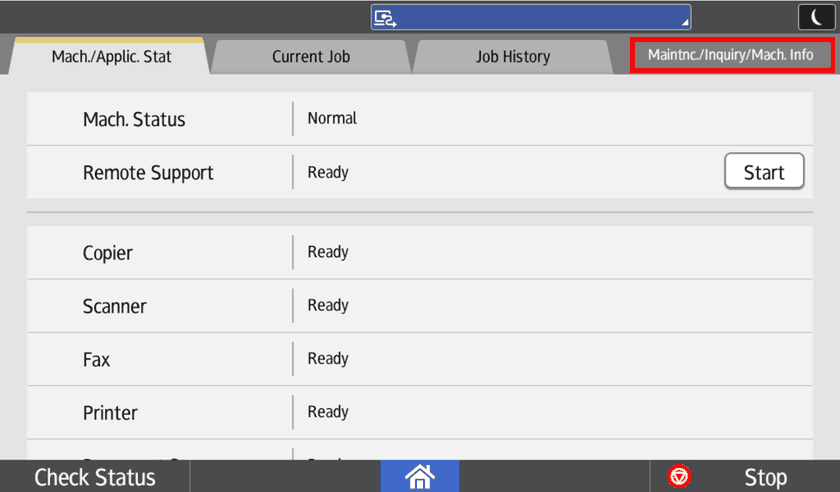
If you can't see it there
Some models put it on a different tab. Press Maintnc./Inquiry/Mach. Info in the top-right and look again.
If the Network line is blank , 169.x.x.x , 11.22.33.44, 127.0.0.0 or shows no IPv4 address, the printer may not be connected to the network. Check the network cable is plugged in at the back of the machine, then look again.
Was this article helpful?
That’s Great!
Thank you for your feedback
Sorry! We couldn't be helpful
Thank you for your feedback
Feedback sent
We appreciate your effort and will try to fix the article