Toner monitoring software
How do I check the software that monitors my printer is running?
It takes a minute on the computer the software is installed on — you'll need to be signed in with administrator rights.
Open EKM Insight in Administrator Mode
On the computer the software is installed on, open EKM Insight (Administrator Mode) from the Start menu.
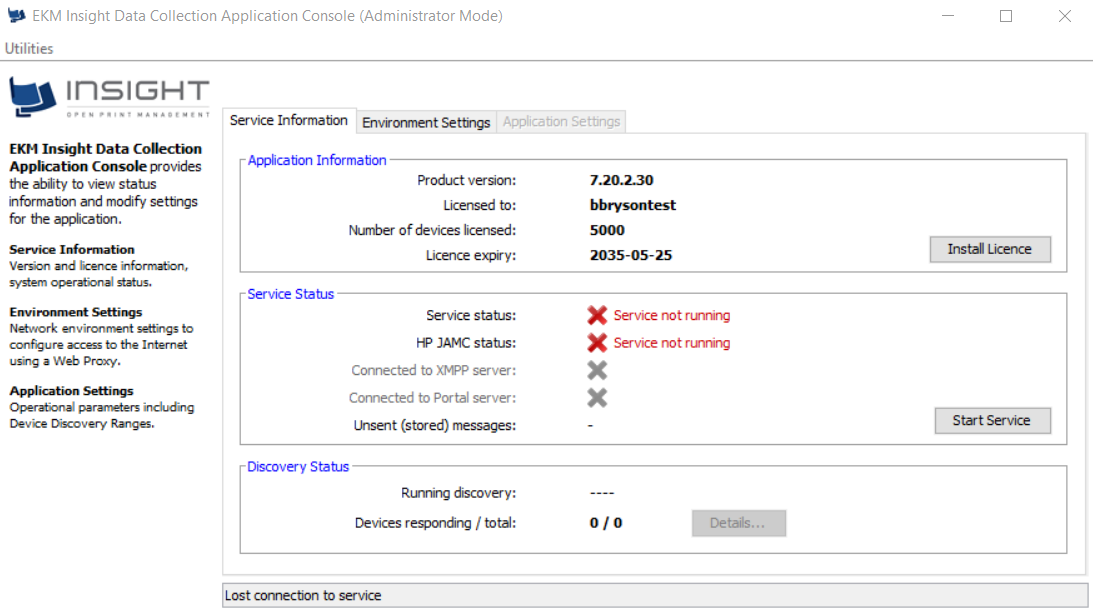
Look at the Service Status box in the middle of the window. If Service status has a red cross beside it and says Service not running, press the Start Service button on the right.
If that doesn't work, open it from the program folder
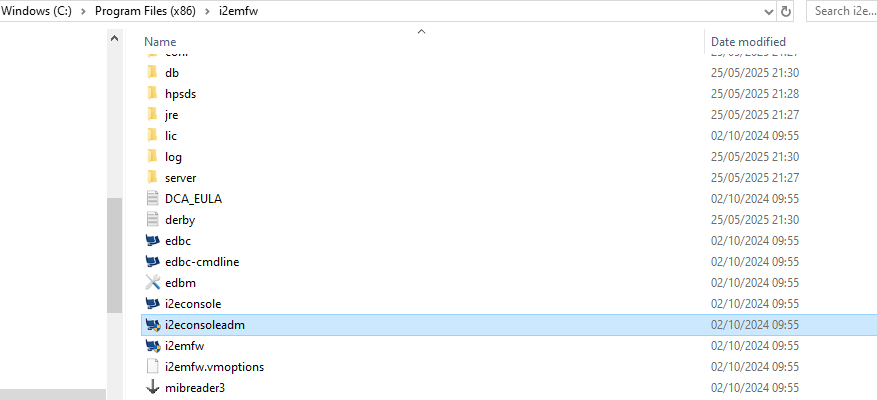
Open File Explorer and go to C:\Program Files (x86)\i2emfw
Find the file i2econsoleadm.exe and double-click it, then press Start Service in the window that opens.
Check it has started
After a few seconds the red crosses should turn to green ticks, and Service status should read Service running. You can then close the window — the service carries on in the background.
Please leave the computer switched on and connected to the network.
Send this page to your IT department, or whoever looks after your systems, and they'll be able to sort it out. If you're not sure who that is, contact us at clientservices@visionplc.co.uk
What issues do I face when VRFM Monitor is down?
While it’s offline, we’re unable to:
• Monitor toner levels to automatically order replacements
• Collect meter readings from your printer
What is EKM Insight DCA Console?
VRFM DCA is a small software tool installed on a PC or server — typically set up by your IT team or whoever manages your devices or network.
What if the computer the software runs on is not in use?
• You can install the software on a different computer connected to your network by following the guide How do I install VRFM - Visions Managed Print Solutions
• You will need a license code to complete the installation. This can be obtained by contacting your account manager or emailing clientservices@visionplc.co.uk
Was this article helpful?
That’s Great!
Thank you for your feedback
Sorry! We couldn't be helpful
Thank you for your feedback
Feedback sent
We appreciate your effort and will try to fix the article